
Ready to Enhance Your Data?
Follow these simple steps to safely send us your file for a Free Prescreen, Quote and Sample Append.
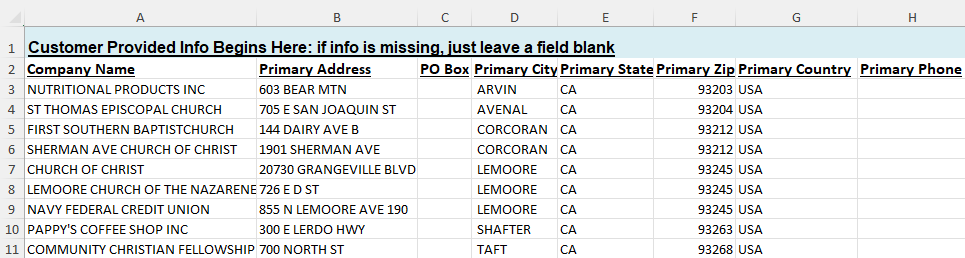
1. Click here to download our Input File Layout.
2. Put the Company Records in the Input File Layout.
3. Drag & Drop: Drop your completed .xlsx or .csv file directly into the secure upload box to the right.
4. We will review your request and get back to you within 2 Business Days. You are also welcome to reach out to us at [email protected] with any questions!
A Dedicated Data Enrichment Specialist will be assigned to your project and assess how your data will perform. We will cross-reference your records against our comprehensive global business database by utilizing every data element you provide – including company names, addresses, phone numbers URLs/domains, stock tickers, and/or DUNS numbers.
Upon running a prescreen, we will return a sample of your data with the desired Business Data, such as NAICS and SIC codes, Company Size information, and Corporate Linkage. You will also been given an estimated append rate for the overall file and pricing to complete the project.
We value accuracy over raw volume. Every match is assigned a confidence score, and we only deliver verified data meeting a score of 7 or higher.
Upload your file today to get a free, no-obligation sample and quote and see the data quality for yourself before committing to a purchase.
We take data security and corporate privacy seriously. Your file is streamed directly into an enterprise-grade, encrypted ShareFile environment, completely isolated from public web servers.
We will only use your data to perform the requested data quality audit and generate your custom append quote. We absolutely do not repurpose, rent, share, or distribute your proprietary business records or customer lists with any third parties under any circumstances.
To ensure your peace of mind, we enforce a strict data retention policy. Your uploaded files and any generated reports will be permanently deleted from our secure environment within 30 days if a project is not approved, immediately upon the completion of an approved project, or at any time upon your explicit request—whichever comes first.
- Run your Lead or Contact report containing your target accounts.
- Click Export in the top right.
- Select Details Only (do not choose Formatted Report).
- Set the Format to Excel (.xlsx) or CSV and click Export. Your address fields will automatically be separated into individual columns!
- Go to your Contacts or Companies list.
- Click Edit Columns and ensure Street Address, City, State/Region, and Postal Code are checked and visible on your screen.
- Click Export in the top right.
- Under Advanced Options, ensure you select “Include only properties in the current columns” and choose XLSX or CSV.
Input File Layout for Download
Upload your Business Data for Review
Only CSV and XLSX formatted files will be reviewed.